Industrial SSD vs Enterprise SSD: A Buyer’s Guide to NAND Grade, DWPD, and Real-World Failure Rates
Industrial SSDs prioritize environmental durability and stable long-term operation — wide-temperature tolerance (-40°C to +85°C), moderate but consistent endurance, and circuit-based power-loss protection. Enterprise SSDs prioritize raw throughput, high DWPD endurance (1–3+), and advanced data-center security features like AES-256 encryption and TCG Opal 2.0 compliance. Most embedded, medical, IPC, and surveillance deployments need industrial-grade storage, not enterprise-grade — and knowing which one your workload actually demands is the difference between right-sizing your spend and over-paying for headroom you’ll never use.
Consumer, Industrial, and Enterprise SSD — Definitions and Comparison Table
Most datasheets use “industrial” and “enterprise” almost interchangeably in their marketing copy, which is exactly why so many procurement teams end up over- or under-specifying a drive. The distinction isn’t marketing language — it’s a set of measurable engineering trade-offs across NAND grade, controller firmware, and physical construction, and it maps directly to three buyer profiles.
Consumer SSD
- NAND: standard-binned TLC or QLC
- Operating temp: 0°C to 70°C
- Endurance: ~0.1–0.3 DWPD
- Power loss protection: minimal or absent
- Typical use: desktops, laptops, gaming rigs, office IT
- Support model: consumer-channel RMA through a retailer, not a technical account manager
Industrial SSD
- NAND: industrial-binned MLC, TLC, or pSLC depending on write profile
- Operating temp: -40°C to +85°C
- Endurance: 0.3–1 DWPD
- Power loss protection: circuit-based, using tantalum capacitors
- Typical use: IPC, medical devices, surveillance NVRs, navigation systems, kiosks
- Selection driver: long, unattended service life in conditions a consumer drive was never tested against — environmental resilience, not raw speed
Enterprise SSD
- NAND: high-endurance-binned MLC or TLC
- Operating temp: 0°C to 70°C, assumes a controlled data center environment
- Endurance: 1–3+ DWPD to survive constant write-heavy workloads
- Data protection: end-to-end protection, AES-256 encryption, TCG Opal 2.0 compliance
- Typical use: OLTP databases, virtualization hosts, AI training clusters
- Interface: skews toward PCIe NVMe (U.2, E1.S) for throughput, though SATA III enterprise drives still exist for less latency-sensitive server roles
Comparison Table
| Consumer SSD | Industrial SSD | Enterprise SSD | |
|---|---|---|---|
| Operating temp | 0°C to 70°C | -40°C to +85°C | 0°C to 70°C (data center controlled) |
| Typical NAND | TLC/QLC, standard binning | MLC/TLC/pSLC, industrial binning | MLC/TLC, high-endurance binning |
| Endurance | ~0.1–0.3 DWPD | 0.3–1 DWPD | 1–3+ DWPD |
| Power loss protection | Minimal or none | Circuit-based (tantalum caps) | Full E2E + PLP |
| Interface/form factor | SATA III, NVMe M.2 | SATA III 2.5″, mSATA, M.2 | PCIe NVMe U.2/E1.S, SATA III |
| Buyer | Consumers, office IT | OEMs, IPC, medical, surveillance | Data centers, cloud, hyperscale |
| Vibration/shock spec | Rarely rated | MIL-STD or equivalent | Rack-mount rated only |
Where the Lines Actually Blur
Two SSDs with identical form factor and advertised capacity can differ in field failure rate by an order of magnitude, because the difference lives in NAND binning and controller firmware — not the label on the box. A SATA III 2.5″ drive can be built to industrial spec (wide-temp NAND, conformal coating, PLP circuitry) or consumer spec (standard TLC, no PLP) while looking identical from the outside. That’s the layer worth understanding before evaluating a spec sheet, which is where we go next.
NAND Grade, Wear-Leveling, and Endurance What’s Actually Different at the Controller Level
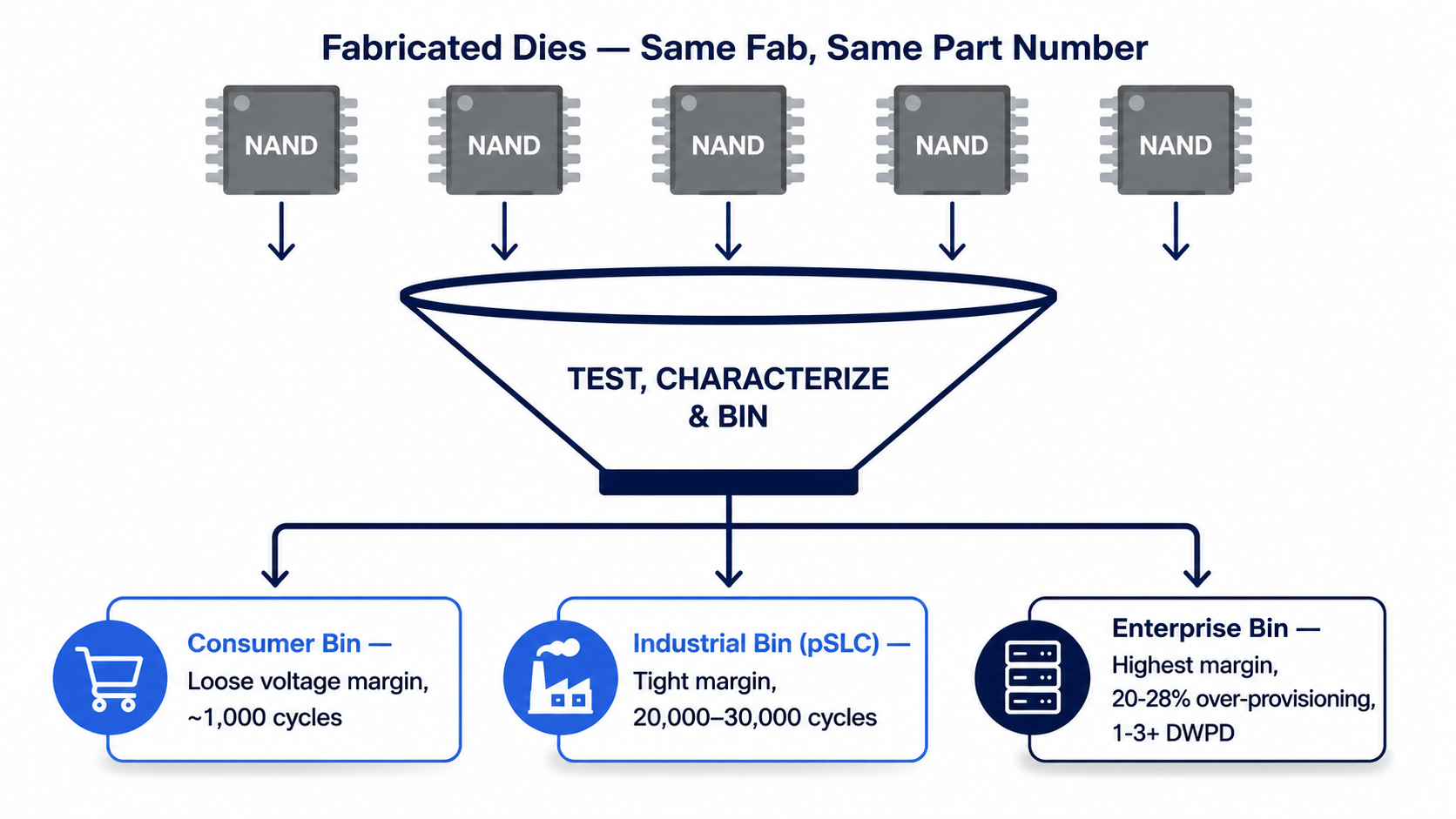
A 1TB TLC SSD rated for 300 P/E cycles per cell and one rated for 3,000 can carry the exact same part number prefix from the same fab — the only thing separating them is which bin the die landed in during factory test, and that single sorting decision is the real story behind the industrial SSD vs enterprise SSD endurance gap.
SLC / pSLC / MLC / TLC Binning
NAND dies aren’t manufactured to different specs from the start; they’re tested and sorted after fabrication.
- Consumer-grade bins: pass at looser voltage margins, lower P/E cycle guarantees (~1,000 cycles for TLC)
- Industrial-grade bins: pass at tighter margins, often re-purposed as pSLC (running TLC/MLC dies in single-bit mode) to push cycles to 20,000–30,000
- Enterprise-grade bins: highest-margin dies, paired with aggressive over-provisioning (often 20–28% vs 7–10% consumer) to sustain 1–3+ DWPD over a 5-year warranty period
This is why an industrial SSD supplier can’t simply relabel a consumer drive — the underlying die selection happens before the controller firmware is even loaded.
Wear-Leveling Algorithms and P/E Cycle Management
Static wear-leveling (used in industrial-grade controllers) actively migrates cold, rarely-changed data to make room for hot data, ensuring blocks storing a boot partition wear at the same rate as blocks handling constant sensor logs — critical in fixed-function embedded systems where the same files get written for years. Dynamic-only wear-leveling, common in consumer controllers, only balances blocks already being actively written, leaving static data blocks to age unevenly.
Reading TBW/DWPD Specs Correctly for Your Write Pattern
A published TBW number is only useful once you convert it to your actual workload:
| Drive rating | Daily write volume it supports (for 5-year life) |
|---|---|
| 100 TBW | ~55 GB/day |
| 1,000 TBW | ~550 GB/day |
| 1 DWPD (1TB drive) | 1,000 GB/day |
An industrial application logging 2GB/hour of sensor data (48GB/day) is comfortably served by a 100 TBW drive — buying a 3 DWPD enterprise SSD for that workload is paying for endurance headroom that will never be used. That question — how much of the enterprise spec sheet you actually need — becomes even more concrete once you look at what’s really being tested behind a wide-temperature rating, which is next.
Environmental & Reliability Engineering — Beyond the -40°C to 85°C Spec Sheet Number
Two suppliers can print “-40°C to +85°C” on the same datasheet line, and one drive will survive a Taiwan summer inside an unventilated roadside traffic cabinet while the other throttles or fails within a year — because the number on the sheet describes the NAND die’s rated tolerance, not what happens to the rest of the board.
Conformal Coating and Component-Level vs. Board-Level Rating
A wide-temperature rating only holds if every component on the PCB — capacitors, controller, DRAM cache — is independently rated to the same range, not just the flash. Industrial builds typically add:
- Conformal coating over the PCB to resist condensation, dust, and salt-fog corrosion
- Tantalum or high-temp polymer capacitors instead of standard aluminum electrolytic ones, which degrade faster outside 0–70°C
- Controller firmware validated at temperature extremes, not just at room temperature with a spec sheet extrapolation
Power Loss Protection: Circuit Design vs. Software-Only Claims
“Power loss protection” on a drive with no visible capacitor bank is usually software-only — it flushes what it can in the milliseconds after power drops, but offers no guarantee on data mid-write. True circuit-based PLP uses tantalum capacitors sized to hold enough charge to complete the in-flight write and safely park the drive, which is the version an OEM/ODM production process actually tests for, block by block, during qualification.
MTBF: What the Number Does and Doesn’t Tell You
A 2-million-hour MTBF does not mean any single drive lasts 228 years — it’s a statistical failure rate across a large population under specific test conditions (often JEDEC or Telcordia standards), and vendors calculate it differently. When comparing an industrial SSD vs enterprise SSD on MTBF alone, always ask which standard and test temperature the number was derived under; an unqualified MTBF figure is close to meaningless for procurement decisions. Once the environmental engineering is understood, the next question is when enterprise-grade features are actually worth paying for.
Enterprise SSD Deep Dive, When You Actually Need DWPD 3+ and Data Center Features
An OLTP database committing thousands of small transactions per second can write 5–10x its logical data volume to NAND once write amplification is accounted for — which is the exact scenario a 3 DWPD enterprise SSD is built for, and the exact scenario where an industrial-grade drive would wear out in months.
Write Amplification in Real Workloads
- AI training checkpoints: large sequential writes, moderate amplification, but sustained over days
- OLTP databases: small random writes, high write amplification (journaling, indexing, redo logs)
- Virtualization hosts: mixed random I/O across many VMs, unpredictable amplification
Each of these justifies the 1–3+ DWPD endurance band and the larger over-provisioning enterprise SSDs carry.
Compliance-Driven Features
- TCG Opal 2.0: self-encrypting drive standard often mandated by finance/healthcare IT policy
- AES-256: hardware-level encryption, no host CPU overhead
- End-to-end data protection: parity checks across the full data path, not just at the NAND layer
The Cost of Over-Specifying
Enterprise SSDs typically carry a 30–60% price premium over an equivalent-capacity industrial SSD, driven by higher NAND binning cost, larger over-provisioning, and compliance certification overhead. Paying that premium for a fixed-function IPC or surveillance NVR that writes a predictable, low-intensity log — the kind of workload covered in the TBW math above — is money spent on headroom the device will never touch. The workload profile, not the industry label on the drive, should decide where that line gets drawn — which is exactly the framework the next section builds.
A Procurement Framework, Matching Storage Grade to Application and TCO

A surveillance NVR that fails at month 14 doesn’t just cost a replacement drive — it costs a technician dispatch, a gap in recorded footage, and in regulated environments, a possible compliance incident, which is why the real comparison procurement teams should run isn’t “industrial vs enterprise SSD” but “cost of the drive vs. cost of it failing in this specific deployment.”
Mapping Applications to Spec Requirements
| Application | Temp exposure | Write pattern | Recommended grade |
|---|---|---|---|
| Medical devices (diagnostic, monitoring) | Controlled, 0–40°C | Low-moderate, predictable | Industrial (PLP + traceability critical) |
| IPC / industrial automation | Wide, often -20 to 70°C+ | Low-moderate, continuous logging | Industrial |
| Surveillance NVR / edge | Wide, uncontrolled | High-volume continuous write | Industrial, higher DWPD tier |
| Cloud / server infrastructure | Controlled data center | High-intensity, random I/O | Enterprise |
TCO: Warranty, Failure Rate, and Replacement Cycle Math
- Compare warranty period against expected deployment lifespan, not just against purchase price
- Factor in field-service cost per failure, not only unit replacement cost — often 3–10x the drive price for remote or embedded deployments
- Ask for batch-level failure rate (RMA%) data, not just MTBF, since MTBF is a statistical model and RMA rate is observed field performance
RFQ Checklist Before You Order
- Confirm actual operating temperature range of the deployment site, not the rated ambient
- Convert your real write pattern into daily GB, then match against TBW/DWPD
- Request PLP circuit details (capacitor-based vs software-only)
- Ask whether NAND lot/firmware is locked for the production run (batch consistency)
- Confirm MTBF test standard and conditions used
With the framework in hand, the remaining decision is who actually builds and ships the drive — and that’s a sourcing question as much as a technical one.
Sourcing Strategy, Authorized Distribution, OEM/ODM, or Own-Brand
Buying “an industrial SSD” is really three different purchasing decisions disguised as one, and picking the wrong one is how OEM brand owners end up locked into a supplier who can’t customize, or paying OEM prices for a spec they could have bought off-the-shelf.
Authorized Distribution vs. Full OEM/ODM Builds
- Authorized distribution: buying an established brand’s existing SKU in bulk — fastest lead time, no customization, relies on the brand’s own QC. Dellwa operates as an authorized bulk distributor for SanDisk, Kingston, Samsung, and HP, alongside partnerships spanning 20+ semiconductor and IC brands.
- Full OEM/ODM: spec-to-finished-product development — custom firmware tuning, packaging, branding, documentation — suited to companies building a hardware product line rather than sourcing a component.
When an Own-Brand Option Makes More Sense Than Custom Branding
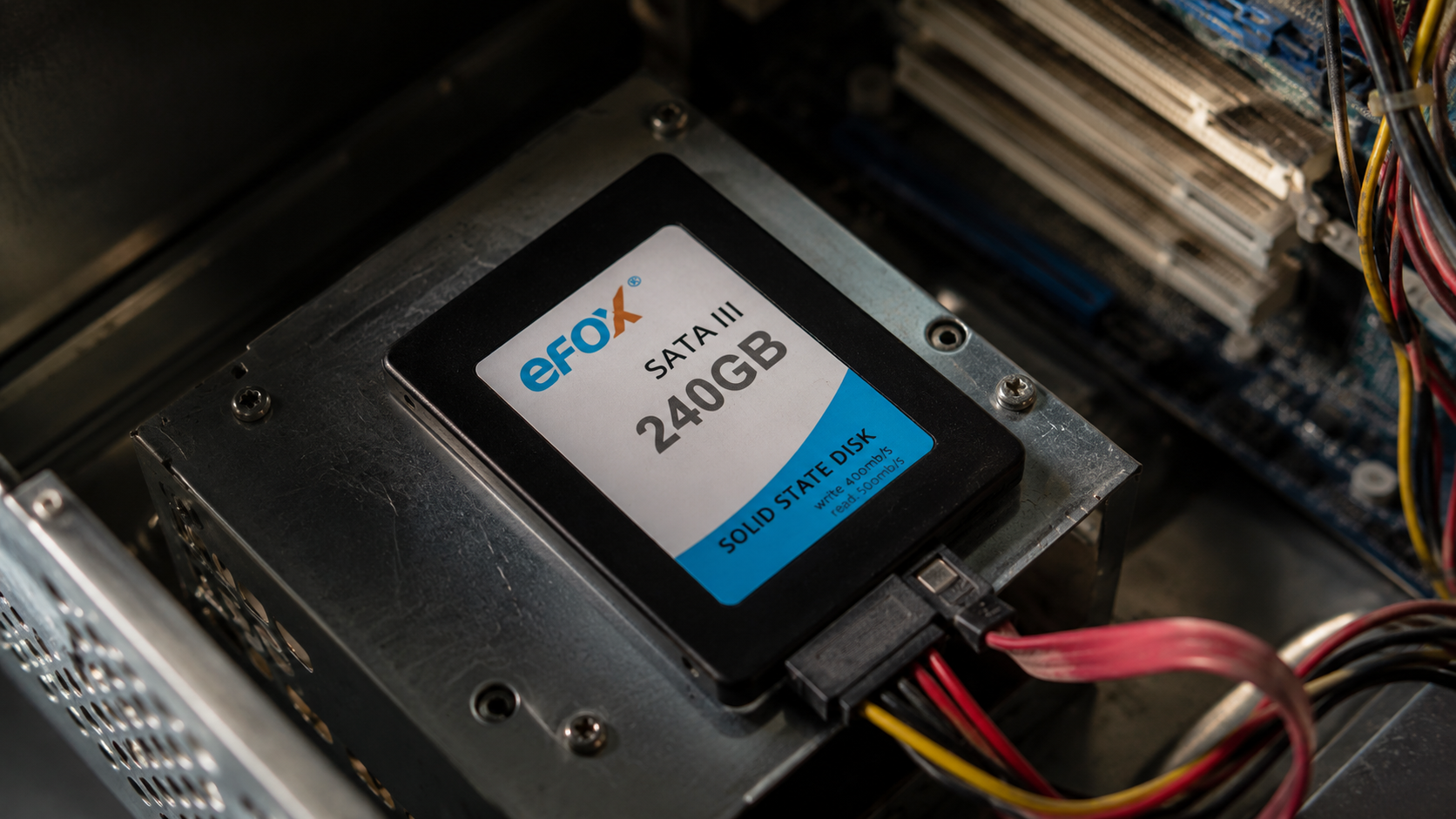
Not every buyer needs a fully custom-branded drive. For smaller order volumes or faster time-to-market, sourcing under an established own-brand line, such as Dellwa’s eFox, provides industrial-grade specs and consistent batch quality without the MOQ and development lead time a full custom OEM build requires. It’s a middle path between “buy off-the-shelf” and “build from spec.”
Vetting a Supplier Before You Commit
- Authorization status: is the supplier an authorized channel for the brands it sells, or a gray-market reseller
- Traceability: can they provide NAND lot and firmware version records per batch
- Track record: Dellwa was recognized as a 2014 Alibaba Taiwan Best Top 10 Supplier and has since operated as a Taiwan-headquartered OEM/ODM partner covering the full industry chain — from IC components through finished SSD, memory card, and USB flash production
Contact Us
If you’re specifying storage for a medical device, IPC deployment, surveillance system, or cloud infrastructure build, the right grade — and the right sourcing path — depends on your actual workload and environment, not a generic spec sheet. Dellwa can walk through your temperature range, write pattern, and volume requirements, and match it against authorized-brand distribution, eFox, or a full custom OEM/ODM build.
Request a Quote / Talk to Our Team
FAQ
Q: What is the difference between SSD and enterprise SSD?
A: A standard/consumer SSD is built for personal computing at 0.1–0.3 DWPD endurance with minimal power-loss protection. An enterprise SSD adds 1–3+ DWPD endurance, AES-256 encryption, TCG Opal 2.0 compliance, and end-to-end data protection to survive continuous, write-heavy data center workloads like OLTP databases and AI training.
Q: What is the difference between consumer SSD and industrial SSD?
A: Consumer SSDs are rated 0°C to 70°C with standard-binned NAND and little environmental protection. Industrial SSDs use industrial-binned NAND, operate from -40°C to +85°C, and add circuit-based power-loss protection and conformal coating — built for unattended field deployments like IPC, medical devices, and surveillance systems, not raw speed.
Q: What are the three types of SSDs?
A: Consumer, industrial, and enterprise. Consumer SSDs serve personal/office computing. Industrial SSDs are engineered for environmental durability in embedded and field deployments. Enterprise SSDs are engineered for high-endurance, high-security performance in data centers and cloud infrastructure. All three can share the same form factor while differing entirely in NAND grade and internal protection circuitry.
Q: What is an industrial SSD?
A: An industrial SSD is a solid-state drive built with industrial-binned NAND, wide-temperature tolerance (-40°C to +85°C), and circuit-based power-loss protection, designed for long, unattended operation in embedded systems such as medical devices, industrial PCs, surveillance NVRs, and navigation equipment.
Q: Do I need an enterprise SSD for my server, or is industrial-grade enough?
A: It depends on write intensity, not just the fact that it’s a server. If your workload involves continuous high-frequency writes (databases, virtualization, AI training), enterprise-grade DWPD and data protection features are justified. If the server handles lighter, predictable logging or edge workloads, an industrial SSD often meets the requirement at a lower cost.
Q: How do I know if a supplier’s wide-temperature spec is real?
A: Ask whether the rating applies to the whole board (capacitors, controller, DRAM) or only the NAND die, request the MTBF test standard used, and confirm whether power-loss protection is circuit-based (visible capacitor bank) or software-only. A supplier that can answer all three with documentation is more credible than one citing a single spec-sheet number.
Q: Is it cheaper to buy an authorized brand, go full OEM/ODM, or use an own-brand line like eFox?
A: Authorized distribution (e.g., SanDisk, Kingston, Samsung, HP) is fastest and cheapest for standard specs at volume. Full OEM/ODM costs more upfront but delivers custom branding and firmware tuning. An own-brand option like eFox sits in between — industrial-grade specs and batch consistency without full custom development lead time — often the better fit for mid-volume orders.